← All projects
In pilot
Ecommerce · Storefront, confirmation & fulfilment
Built inside IntiGo
2026

Intigo Ecommerce

A storefront builder, a catalog and a confirmation desk in one back-office, connected to IntiGo's delivery network — so a Tunisian seller goes from "I have products" to "parcel on the road" without leaving IntiGo.

Partners already ship parcels with IntiGo. The ecommerce module gives them the shop in front of those parcels: a shop an AI assistant can draft from a few photos and a short description, a theme-based storefront builder, a catalog with variants and coupons, a team that confirms cash-on-delivery orders by phone, Meta tracking that survives ad blockers, and a hand-off into the logistics network. I built the seller side of this module; I also know the rest of the loop (delivery, WhatsApp validation, Facebook and marketing) and describe it below as knowledge, not as my own code. It currently runs on staging behind a soft-launch allowlist.

Written by , senior full-stack engineer in Tunis. LinkedIn · GitHub

DjangoPostgreSQLTheme engineMeta PixelConversions APICeleryIdempotencyRTL / ArabicCarbon designSpec-First

“What does a seller need between "a buyer clicked" and "a parcel left the warehouse"?”

A shop from a simple prompt and a few assets

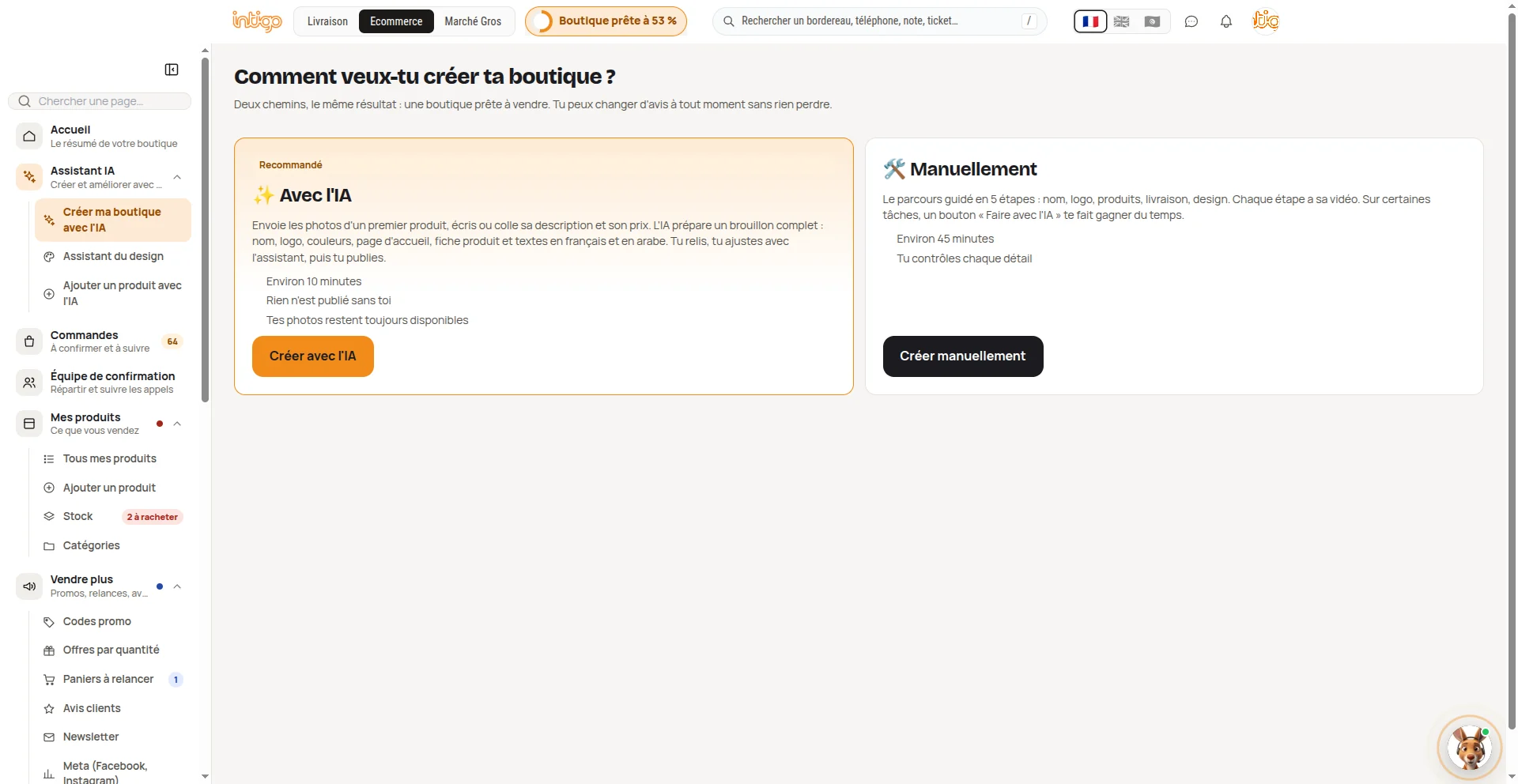
The part sellers remember is the shortest one: send the photos of a first product, write or paste its description and price, and an AI assistant prepares a complete draft shop in about ten minutes: name, logo, colours, home page, product page, and copy in French and Arabic, with product images built from the real photo. The seller reads it, adjusts it with the builder assistant and publishes. The manual path (five guided steps, about 45 minutes) stays one click away, and switching loses nothing.

It is not a Lovable-style generator. Prompt-to-code tools give the user source code to understand and maintain. Here the model never writes HTML, CSS or templates: it returns JSON that is cleaned field by field and applied through the theme engine's own services, so the output is always a valid shop in the same builder the seller already uses. That constraint is the feature. A merchant wants a working shop in ten minutes, not unlimited freedom, and a closed format can be tested, capped and fixed.

Credit where it is due: the assistant itself is a teammate's work. What I built is the engine it drives (sections, settings, sector presets, drafts and revisions), and I integrated the assistant into the seller back-office and merged it into staging. It works because the engine is declarative.

The dashboard: what should the seller do next?

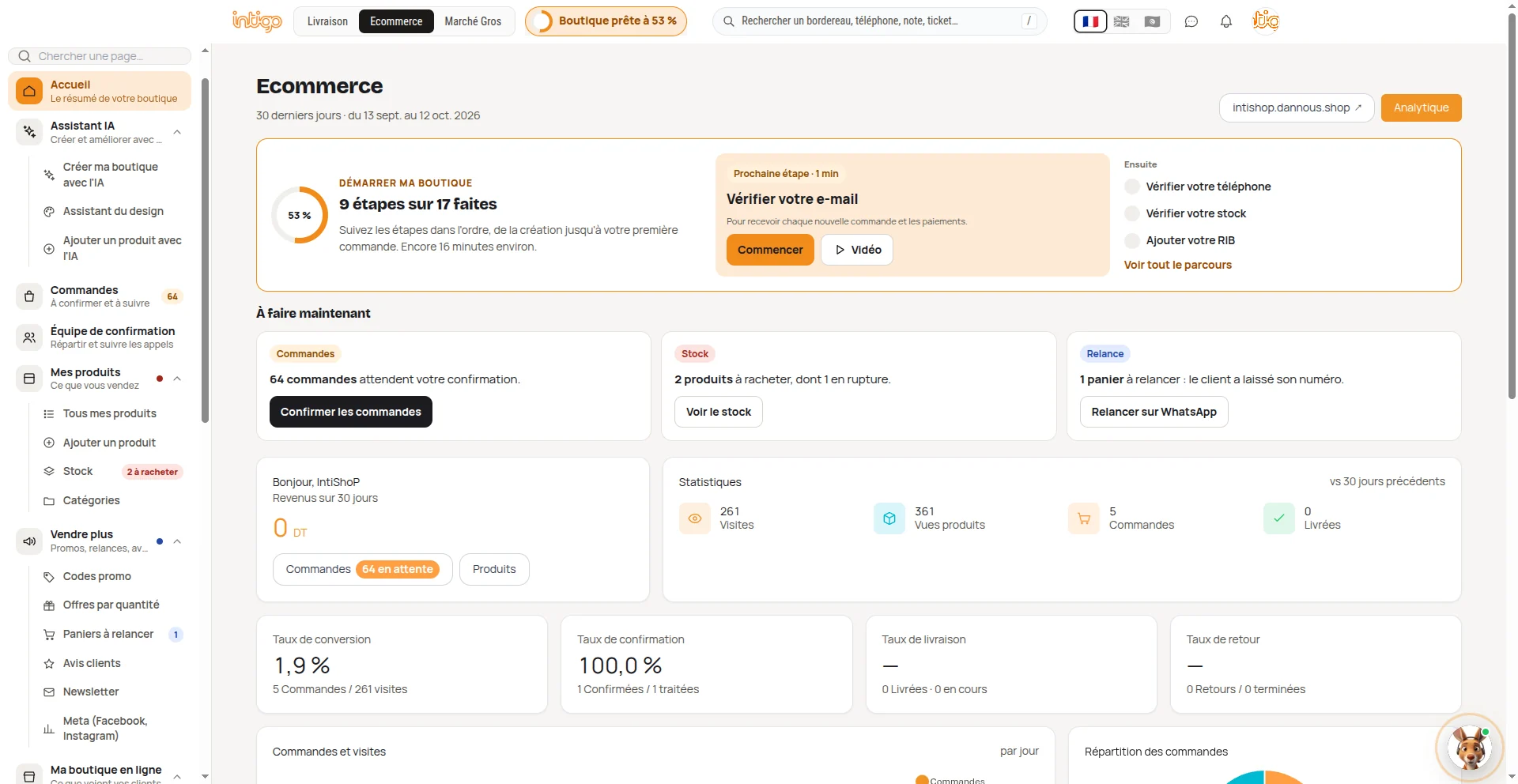
The seller dashboard is built around one question. Before any chart it shows three work queues (orders to confirm, stock to restock, abandoned carts to relaunch on WhatsApp), each with one number and one button, then a guided onboarding that sizes the next step in minutes. Below that come the rates, and each one shows its numerator and denominator, with an honest dash instead of a misleading 0% when there is nothing to measure.

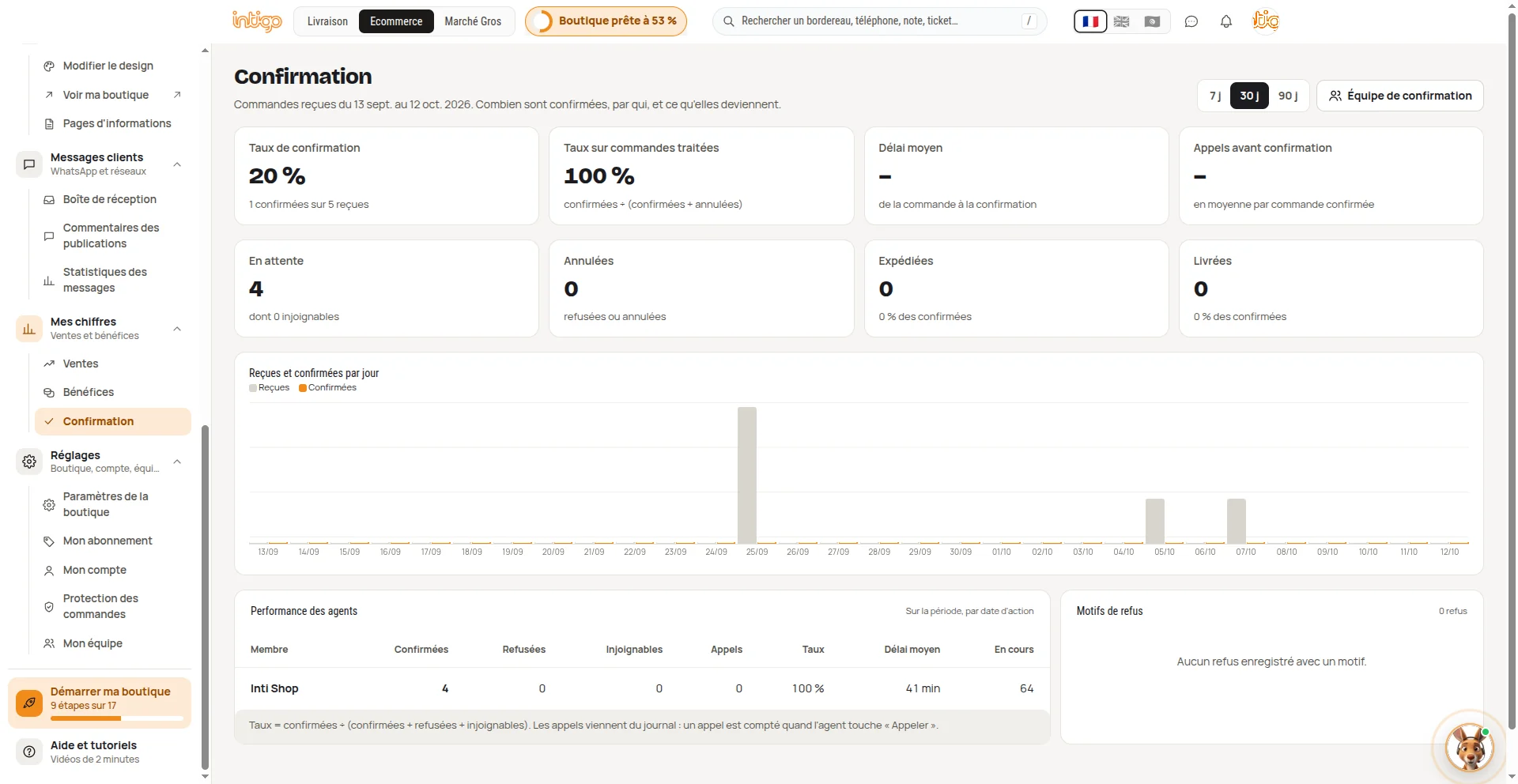
Two details I would defend in a design review: the dashboard and the confirmation page deliberately show two confirmation rates, one per treated order (agent quality) and one per received order (backlog), so a perfect rate cannot hide a growing queue; and the side menu is grouped by what the seller wants to do, with live badges that reuse the numbers on the action cards so the counts always agree. The screenshots and a written reading of each screen are above and below. The figures come from a test shop on staging.

What I built, and what I know

Built by me (the seller side): the theme-based storefront builder and its templates, the seller back-office, the confirmation team CRM with its risk scoring, the Meta Pixel, Conversions API and catalogue integration, abandoned-cart recovery and coupons. Everything in this list I designed and implemented, and it is the part you can see in the screenshots.

Known, not built by me: the delivery side (parcel creation, driver and logistics tracking, WhatsApp validation at the parcel's first scan) belongs to the logistics team, and the Facebook advertising campaigns belong to marketing. I have worked with both ends of the loop closely enough to explain it from the buyer's first click on an ad, through the storefront, the confirmation call and the delivery, back to the Pixel event and the next campaign. That whole loop is drawn below.

The storefront — a builder that cannot lose your shop

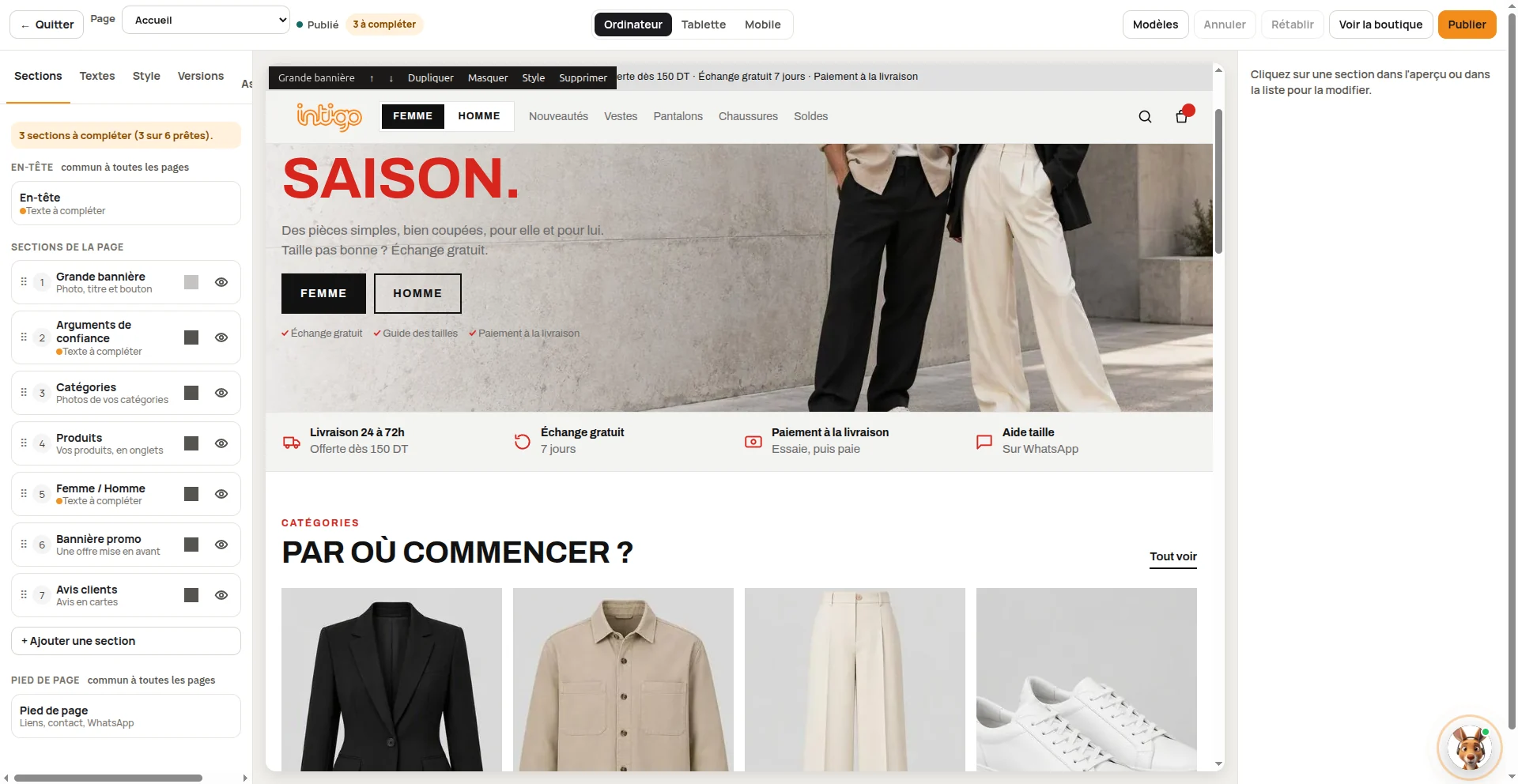
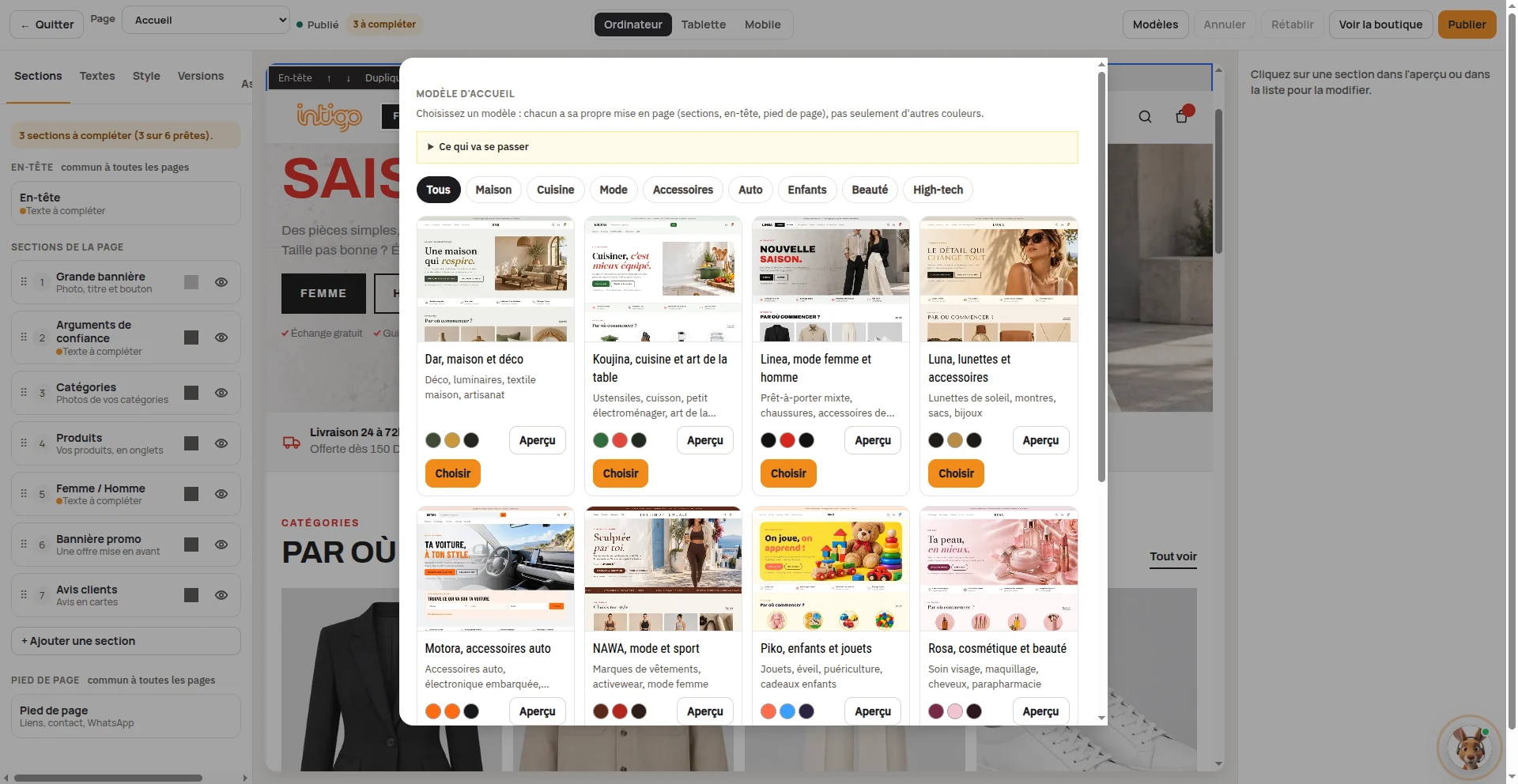
The old template system is gone; everything runs on one theme engine. 11 theme packages, 10 sector presets (fashion, cosmetics, electronics, furniture, …), draft and publish, and a revision taken before every publish so a bad version is one restore away. The storefront renders right-to-left in Arabic.

Only the home page is engine-driven. Product, cart and checkout stay fixed pages so a seller can redecorate the front door without breaking the till.

Catalog, coupons and promotions

Products, variants, categories, digital codes (single-use), an inventory screen with low-stock threshold, and a trash with purge. Coupons are percentage or fixed, with a cap, a minimum cart, a window and per-phone limits; redemption runs under a row lock with an idempotency key. Quantity tiers, packs and buy-one-get-one live next to them.

Cash-on-delivery needs a confirmation desk

Most orders are COD, so the first question is whether the buyer is real. Each order gets a 0–100 risk score from the buyer's parcel history across shops and orders-per-phone-per-day; risky orders are held. A manager assigns the queue, each agent works their own: call, confirmed / unreachable / refused, notes, callbacks. Every transition is an OrderEvent, so the journal answers "who did what, when".

Team access is explicit: owner and member roles, four store rights (catalog, orders, storefront, stats), and a dedicated confirmation-agent role that can only manage orders.

Marketing signals that survive the browser

Each shop can connect a Meta Pixel and the Conversions API. The browser and the server send the same event_id so Meta deduplicates; buyer data is SHA-256 hashed, the token is stored encrypted, and every send is logged. A catalog feed, TikTok and GA4 pixels, and opt-in WhatsApp reminders for abandoned carts complete the picture. To be clear about scope: this is tracking and recovery, not an ad-campaign manager.

Fulfilment — the part of the loop I know, not the part I built

Once an order is confirmed, it enters IntiGo's delivery network: a parcel is created with the cash on delivery equal to the order total, the driver delivers, and the order page shows the live parcel status. The buyer follows a token link. Separately, logistics can send a WhatsApp Confirm / Cancel message at the parcel's first scan (soft or strict mode, never holding the parcel while waiting). I did not build this side, but I know how it works end to end, and it is what makes the human confirmation desk before shipping and the WhatsApp validation after the first scan two separate safety nets.

Where it stands

The module is on staging with a soft launch behind an allowlist; I am not claiming production traffic. Known gaps I track openly: online payment (COD only), stock-movement history, and a few counters that need hardening. The test suite is the safety net — around 1,200 test functions across store, theme, coupon, product and Meta code.

I am grateful for this experience: it let me follow one order the whole way round, from the buyer's view of the storefront to the delivery, and back to Facebook and the marketing that brings the next buyer.
AI shop creation

A shop from a simple prompt and a few assets.

The seller sends photos of a first product, its description and its price. The assistant prepares a complete draft in about ten minutes. It is not a code generator: it is easier for our customers, because the result is always a valid shop they already know how to edit.

ai.pipelineGraph · from prompt to shop
  1. Seller1
    A prompt and a few photos

    Photos of a first product, plus its description and price, typed or pasted.

  2. AI model2
    Analyse

    A vision model reads the photos and the facts the seller gave.

  3. AI model3
    Store brief as JSON

    Name, colours, French and Arabic copy, sections, logo, banners. JSON, never HTML.

  4. Theme engine4
    Clean and validate

    Field by field: an invalid field is dropped, never an exception.

  5. Theme engine5
    Applied as a draft on the engine

    Through the theme engine's own services, with a snapshot of the live state before any write.

  6. Seller6
    Review and adjust

    In the builder, with a chat assistant whose every tool call is validated the same way.

  7. Seller7
    Publish

    Only the seller publishes. The assistant never does.

The seller decidesThe model stops at JSONThe engine validates and applies

Why this is not prompt-to-code

Tools that generate code, such as Lovable, hand the user a project to understand and maintain. Here the model fills a fixed, validated shop engine: the seller gets a shop, not a codebase. The constraint is deliberate. For a merchant, a working shop in ten minutes beats unlimited freedom, and for us a closed format can be tested, capped and fixed.

Two paths, the same result: "Avec l'IA" (about 10 minutes, nothing is published without the seller) or "Manuellement" (five guided steps, about 45 minutes, a video per step).

Who built what

The AI assistant itself is a teammate's work. What I built is the engine it drives: sections, settings, sector presets, drafts and publish revisions. The assistant works because that engine is declarative. I then integrated it into the seller back-office and merged it into staging.

ai.guardrailsAnalysis · guardrails
  • The model never writes code

    No HTML, no CSS, no templates: only JSON that matches a schema. The result is always a valid shop, editable in the same builder.

  • Everything is a draft

    Sections, settings, copy and products wait for the seller's Publish. A snapshot is taken before every write, so it can be rolled back.

  • Images start from the real photo

    Product visuals are edited from the seller's own photo, never invented. Figures in an infographic come from the seller's text: the model may not invent any.

  • Cost and capacity under control

    Per-shop daily caps (generations, messages, images), an image queue with a global per-minute quota, retry on rate limits.

  • Always a plan B

    Without keys, or with the assistant switched off, only the manual path is offered. Both paths end in the same shop and the seller can switch without losing anything.

The dashboard

What should the seller do next?

A reading of the screenshots above, from an engineer's point of view: what each screen shows, then why it is built that way. The numbers come from a test shop on staging, not from production.

01

Action before the scorecard

What the screen shows

"À faire maintenant": 64 orders to confirm, 2 products to restock (1 out of stock), 1 abandoned cart to relaunch on WhatsApp. Three cards, one number and one button each.

Analysis

The page answers "what do I do now?" before "how am I doing?". Each card is a work queue, not a chart: the unit is a decision. Capping it at three cards stops them competing for attention.

02

Onboarding as a progress system

What the screen shows

"Démarrer ma boutique": 9 of 17 steps, a 53% ring, next step in 1 minute (verify the email) with Start and Video buttons, then the next three. The same 53% stays in the top bar.

Analysis

One next step, sized in minutes, with a video: it fights the blank-page problem. The persistent indicator in the top bar keeps the goal visible on every page without taking space.

03

A funnel with visible denominators

What the screen shows

261 visits, 361 product views, 5 orders, 0 delivered. Conversion 1.9% with "5 orders / 261 visits" underneath. Delivery and return rates show "—" with "0 delivered · 0 in progress".

Analysis

Every rate carries its numerator and denominator, so the seller can audit it. When there is nothing to measure it shows "—" rather than 0%, which would read as failure.

04

Two confirmation rates, on purpose

What the screen shows

On the Confirmation page: "Taux de confirmation" 20% (1 confirmed of 5 received) and "Taux sur commandes traitées" 100% (confirmed / confirmed + cancelled), with the formula in the footer.

Analysis

The treated-orders rate measures agent quality; the received-orders rate measures backlog. Showing both stops a flattering 100% from hiding a queue that keeps growing.

05

Navigation by the seller's job, with live badges

What the screen shows

Groups: Assistant IA, Commandes (64), Équipe de confirmation, Mes produits (2 to restock), Vendre plus (promo codes, quantity offers, carts to relaunch 1, reviews, newsletter, Meta), Ma boutique en ligne, Messages clients, Mes chiffres, Réglages. At the top: a Livraison / Ecommerce / Marché Gros switch.

Analysis

The menu follows what the seller wants to do (confirm, sell more, check numbers), not the database structure. The badges reuse the numbers on the action cards, so the counts agree. The top switch puts three businesses in one portal and one account.

06

Confirmation analytics for the manager

What the screen shows

Received and confirmed per day, a per-agent table (confirmed, refused, unreachable, calls, rate, average delay 41 min, in progress) and refusal reasons (empty: "Aucun refus enregistré avec un motif").

Analysis

The manager sees who confirms, how fast and why buyers refuse, which is what improves the call script. Calls come from the journal: a call is counted when the agent taps "Appeler".

dashboard.funnelGraph · funnel (staging)
Visits261
Orders5 · conversion 1.9%
Confirmed1 of 5 received
Delivered0 · none shipped yet

Test shop, 13 Sep to 12 Oct 2026. Bars are linear: the drop from visits to orders is expected on test data, and what matters here is the format (numerator and denominator shown).

The whole loop

From the first click to back at Facebook.

One order goes all the way round: ad, storefront, order, confirmation, delivery, outcome, then signals sent back to Meta for the next campaign. I know all seven stages. I built the ones in purple; the others are other teams' systems that I know well.

loop.diagramGraph 1 · the loop
7 stagesI know every oneI built 41Ads2Storefront3Order4Confirmation5Delivery6Outcome7Meta signals
  1. 1
    Facebook & marketing

    Facebook and Instagram campaigns bring the buyer in. I know this part; the campaigns belong to marketing.

  2. 2
    Storefront (client view)

    What the buyer sees: theme, product page, cart, coupons, Arabic and RTL. The storefront builder is my work.

  3. 3
    Order

    Cash-on-delivery order, stock decremented, 0-100 risk score, risky orders held.

  4. 4
    Confirmation

    Confirmation team: queue per agent, calls, callbacks, refusal reasons, event journal. A CRM I built.

  5. 5
    Delivery

    Parcel creation, driver, tracking, WhatsApp validation at first scan. The logistics team's system, which I know.

  6. 6
    Outcome

    Delivered, refused or returned, and the COD collection. I know how this result flows back to the seller.

  7. 7
    Signals back to Meta & retargeting

    Pixel + Conversions API (deduplicated event_id), catalogue feed, WhatsApp abandoned-cart reminders: the loop returns to the ads. An integration I built.

Built by meKnown: another team's system
loop.coverageGraph 2 · coverage
Knowledge of the loop7 / 7
Built by me4 / 7

Grateful for this experience: it let me follow one order from the ad all the way to delivery, and back to Facebook and the marketing.

End-to-end flow

Two layers of confirmation.

A store order is first confirmed by a human team; once the parcel exists, a WhatsApp validation takes over at its first scan. Two distinct safety nets, in two systems.

From order to delivery
  1. 01
    Order placed

    The cart is re-priced server-side, stock is decremented with a compare-and-swap, and the pixel and CAPI emit the same event_id.

    Built by me
  2. 02
    Risk score

    0–100 score (buyer reliability from parcel history across shops, orders per phone per day). Above the threshold, the order is held.

    Built by me
  3. 03
    Team confirmation

    A manager assigns, each agent works their own queue: call, confirmed / unreachable / refused, notes, callbacks. Everything lands in the OrderEvent journal.

    Built by me
  4. 04
    Ship

    ship_order requires the confirmed status, locks the row, creates the parcel with COD = order total, and stores the parcel NID.

    Known, not built by me
  5. 05
    Parcel WhatsApp validation

    On the first physical scan, the Confirm / Cancel template goes to the buyer (soft or strict mode). No answer: delivered by default.

    Known, not built by me
  6. 06
    Delivery & live status

    The order page reads the live parcel status; the buyer tracks via a token link.

    Known, not built by me
--:--:--·TUN